FLN Digital Assessment Tool 2026 for Classes 4 to 10 | Excel Import, Auto Grade & Print
FLN Digital Assessment Tool 2026: Managing student assessment records can be time-consuming for teachers, especially when student names, subject-wise assessment details, grades, and totals have to be entered and calculated manually.
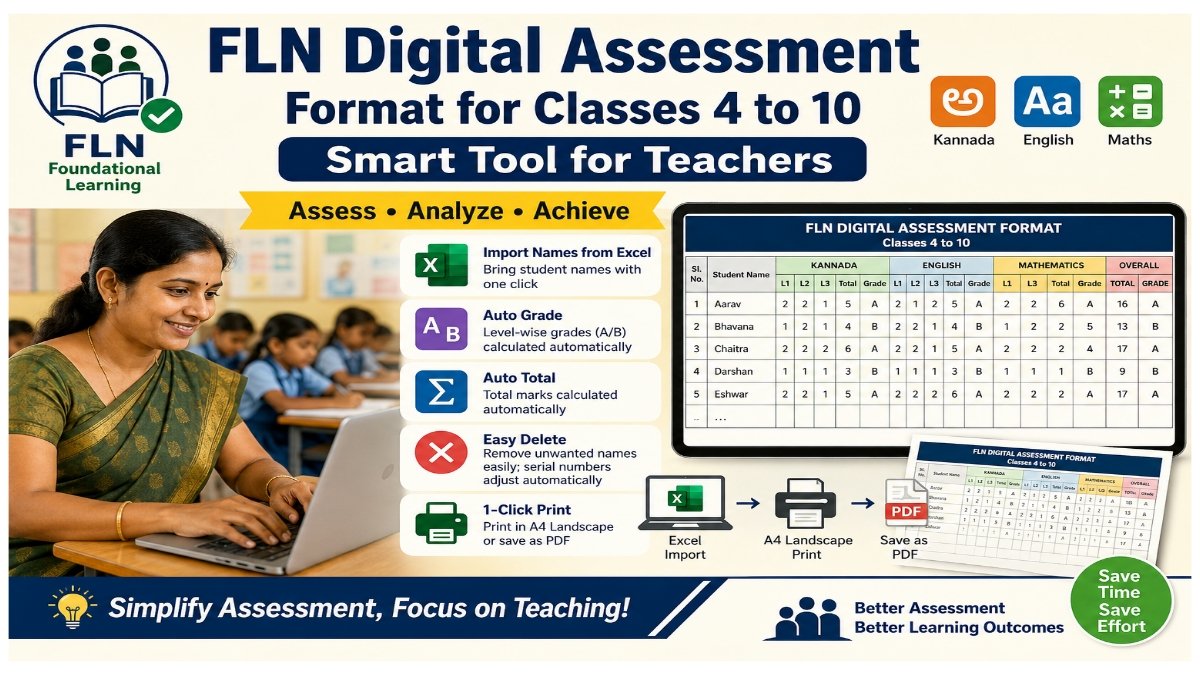
To make this work easier, a FLN Digital Assessment Format for Classes 4 to 10 is available as a simple and smart online tool. It helps teachers manage Kannada, English, and Mathematics assessments in a single format.
🔗 FLN Digital Assessment Tool
👉 Open FLN Digital Assessment Tool
The tool can be accessed through a web browser on a mobile phone, tablet, or computer.
Key Features of FLN Digital Assessment Tool
1. Three Subjects in One Format
The tool supports assessment for three important subjects:
- Kannada
- English
- Mathematics
Teachers can manage the assessment details of all three subjects using a single format.
2. Import Student Names from Excel
Entering the names of students one by one can take a lot of time.
This tool provides an Excel Import facility that allows teachers to bring student names into the assessment format easily.
This can be especially useful for classes with a large number of students.
3. 🅰️🅱️ Automatic Grade Calculation
The tool can automatically calculate the level-wise grade, such as:
- A Grade
- B Grade
This reduces the need for manual grade calculation.
4. ➕ Automatic Total Calculation
After entering the required assessment details, the Total is calculated automatically.
Teachers do not need to perform the calculations separately.
5. ❌ Easy Delete Option
If a student name or record is not required, it can be easily removed using the Delete (❌) option.
After deleting a name, the serial number automatically adjusts accordingly.
6. One-Click Print
The completed assessment format can be printed easily.
The tool is designed to support A4 Landscape printing, and teachers can also save the assessment sheet as a PDF when required.
How This Tool Helps Teachers
The FLN Digital Assessment Tool can reduce the amount of manual work involved in maintaining student assessment records.
Benefits include:
✅ Easy student name management
✅ Excel name import facility
✅ Kannada, English and Mathematics in one format
✅ Automatic grade calculation
✅ Automatic total calculation
✅ Easy deletion of student records
✅ Automatic serial number adjustment
✅ A4 Landscape print format
✅ Option to save as PDF
✅ Saves teachers’ time and effort
📝 How to Use the FLN Digital Assessment Tool
Step 1: Open the Tool
Visit the following link:
👉 FLN Digital Assessment Tool – Open Now
Step 2: Add Student Names
Enter student names manually or use the Excel Import option to add names.
Step 3: Enter Assessment Details
Enter the required assessment information for:
- Kannada
- English
- Mathematics
Step 4: Check Grades and Total
Once the assessment information is entered, check the automatically calculated Grade and Total.
Step 5: Delete Unwanted Records
Use the ❌ Delete option to remove any unwanted student record.
Step 6: Print or Save as PDF
After completing the assessment, use the Print option to print the format in A4 Landscape or save it as a PDF.
🎯 Who Can Use This FLN Tool?
The tool can be useful for:
- Government school teachers
- Primary school teachers
- Secondary school teachers
- Class teachers
- Teachers maintaining FLN assessment records
- Teachers recording students’ learning progress
📌 Important Note
Teachers should carefully verify student names and assessment details before printing or saving the final assessment record.
When using digital tools, appropriate care should also be taken to protect students’ personal information.
🔗 FLN Digital Assessment Tool – Direct Link
Teachers can access the tool here:
👉 Click Here to Open FLN Digital Assessment Tool
❓ Frequently Asked Questions (FAQ)
1. What is the FLN Digital Assessment Tool?
It is a digital tool designed to help teachers record and manage FLN assessment information in an easier format.
2. Which subjects are included?
The tool includes Kannada, English and Mathematics.
3. Can student names be imported from Excel?
Yes. The tool provides an Excel Import facility for adding student names.
4. Does the tool calculate grades automatically?
Yes. The grade can be calculated automatically based on the entered assessment information.
5. Is the total calculated automatically?
Yes. The total is calculated automatically after entering the required information.
6. Can a student name be deleted?
Yes. The Delete (❌) option can be used to remove an unwanted student record.
7. Can the assessment format be printed?
Yes. The format can be printed in A4 Landscape format and can also be saved as a PDF.
8. Can the tool be used on a mobile phone?
Yes. It can be accessed through a compatible web browser on a mobile phone, tablet, or computer.
A Smart and Useful Tool for Teachers
Maintaining FLN assessment records becomes easier when digital tools are used for repetitive tasks such as entering student names, calculating grades, calculating totals, and preparing the final printout.
The FLN Digital Assessment Tool for Classes 4 to 10 brings these features together in one convenient format.
👉 Open FLN Digital Assessment Tool
Share this useful tool with fellow teachers who may find it helpful.

