HRMS-ESS / KAMS App: ಹಾಜರಾತಿ ಮತ್ತು Geo-Location ದೃಢೀಕರಣ
HRMS-ESS / KAMS App: HRMS-ESS / ಕರ್ತವ್ಯ (KAMS) App ನಲ್ಲಿ ಹಾಜರಾತಿ ದಾಖಲಿಸುವ ವಿಧಾನ, ಕಚೇರಿಯ ಭೌಗೋಳಿಕ ನಿರ್ದೇಶಾಂಕಗಳ (Geo Coordinates) ದೃಢೀಕರಣ ಪ್ರಕ್ರಿಯೆ, ಅಗತ್ಯ ಸೂಚನೆಗಳು ಹಾಗೂ ನೌಕರರು ಪಾಲಿಸಬೇಕಾದ ಮಾರ್ಗಸೂಚಿಗಳ ಸಂಪೂರ್ಣ ಮಾಹಿತಿ ಇಲ್ಲಿ ಪಡೆಯಿರಿ. HRMS-ESS ಮತ್ತು KAMS App ಬಳಕೆದಾರರಿಗೆ ಉಪಯುಕ್ತ ಮಾರ್ಗದರ್ಶಿ.
ಮೇಲ್ಕಂಡ ವಿಷಯ ಮತ್ತು ಉಲ್ಲೇಖಕ್ಕೆ ಸಂಬಂಧಿಸಿದಂತೆ, ದಿನಾಂಕ:05.06.2026 ರಂದು ಹೊರಡಿಸಿದ ಸರ್ಕಾರದ ನಿರ್ದೇಶನದಂತೆ ಎಲ್ಲಾ ಅಧಿಕಾರಿಗಳು ಹಾಗೂ ಸಿಬ್ಬಂದಿಯವರು ತಮ್ಮ ಹಾಜರಾತಿಯನ್ನು HRMS ನಲ್ಲಿ ಲಭ್ಯವಿರುವ ಕರ್ತವ್ಯ (KAMS) App ಮೂಲಕ ಬೆಳಿಗ್ಗೆ 10.00 ಗಂಟೆಗೆ ಕಡ್ಡಾಯವಾಗಿ ದಾಖಲಿಸಬೇಕಾಗಿದೆ ಎಂದು ತಿಳಿಸಿದೆ.
ಈ ಹಿನ್ನೆಲೆಯಲ್ಲಿ ಎಲ್ಲಾ ಇಲಾಖಾ ಮುಖ್ಯಸ್ಥರು (HODs) ಹಾಗೂ ಅಧೀನದಲ್ಲಿರುವ ಎಲ್ಲಾ Drawing and Disbursing Officers (DDOs) ರವರಿಗೆ ಕೆಳಕಂಡ ನಿರ್ದೇಶನಗಳನ್ನು ಅಗತ್ಯ ಕ್ರಮ ಕೈಗೊಳ್ಳಲು ತಿಳಿಸಲಾಗಿದೆ.
ನಿರ್ದೇಶನಗಳು:
1. Group ‘B’ ಅಥವಾ ಅದಕ್ಕಿಂತ ಮೇಲ್ದರ್ಜೆಯ ಅಧಿಕಾರಿಗಳನ್ನು HRMS-2.0 https://hrms2.karnataka.gov.in Web Portal ನಲ್ಲಿ ನಾಮನಿರ್ದೇಶನ ಮಾಡಿದ ನಂತರ, ತಮ್ಮ ಕಚೇರಿಯ ಭೌಗೋಳಿಕ ನಿರ್ದೇಶಾಂಕಗಳನ್ನು (Geo Coordinates) HRMS-ESS App ಮೂಲಕ ಸೆರೆಹಿಡಿಯಬೇಕು.
2. HRMS-ESS App ನಲ್ಲಿ ಸೆರೆಹಿಡಿಯಲಾದ ಭೌಗೋಳಿಕ ನಿರ್ದೇಶಾಂಕಗಳನ್ನು HRMS-2.0 Web Portal (Web Address: https://hrms2.karnataka.gov.in) ನಲ್ಲಿ ಲಾಗಿನ್ ಆಗಿ ಪರಿವರ್ತಿಸಿ ಹಾಗೂ ದೃಢೀಕರಿಸಬೇಕು.
3. ಹಾಜರಾತಿಯನ್ನು ಎಲ್ಲಾ ಅಧಿಕಾರಿಗಳು ಮತ್ತು ಸಿಬ್ಬಂದಿಯವರು ಕರ್ತವ್ಯ (KAMS) App ಮೂಲಕ ಕಡ್ಡಾಯವಾಗಿ ದಾಖಲಿಸುವಂತೆ ಕ್ರಮವಹಿಸಬೇಕು.
ಸೂಚನೆ:
ಕರ್ತವ್ಯ (KAMS) App ನಲ್ಲಿ ಹಾಜರಾತಿ ದಾಖಲಿಸುವ ಸಂದರ್ಭದಲ್ಲಿ ಯಾವುದೇ ತಾಂತ್ರಿಕ ಸಮಸ್ಯೆಗಳು ಕಂಡುಬಂದಲ್ಲಿ CEG Helpdesk ಅನ್ನು ಸಂಪರ್ಕಿಸಬಹುದು.
Helpdesk ಸಂಖ್ಯೆ: 8277078123
Email: KAMS.helpdesk@karnataka.gov.in
ಅಡಕ:
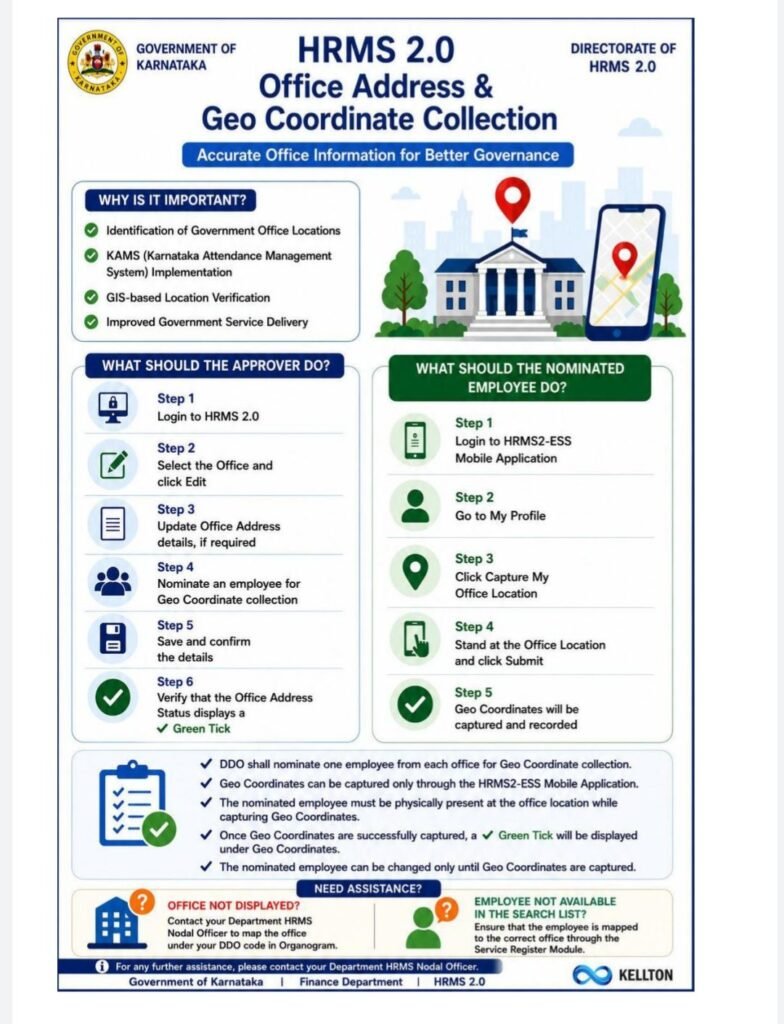
ಕಚೇರಿಯ ನಿಖರವಾದ ಭೌಗೋಳಿಕ ನಿರ್ದೇಶಾಂಕಗಳನ್ನು ಸೆರೆಹಿಡಿಯುವ ಕುರಿತು ಮಾರ್ಗಸೂಚಿ ಪ್ರತಿಯನ್ನು ಪತ್ರದ ಜೊತೆಯಲ್ಲಿ ಲಗತ್ತಿಸಲಾಗಿದೆ.
Frequently Asked Questions (FAQs) – Office Address and Geo Coordinate Collection
1. Who can update the office address details in HRMS 2.0?
Only the Approver can edit or update the office address details.
2. Why is office address and Geo Coordinate information being collected?
The information is being collected to maintain accurate office location details and to support location-based services, including attendance management through KAMS.
3. Who should be nominated for Geo Coordinate collection?
The DDO can nominate himself or shall nominate an Group ‘B’ or higher officer from each office for capturing the Geo Coordinates of the office.
4. How can I update the office address details?
Login to HRMS 2.0 as Approver, select the office, click on the Edit button, update the required details, nominate an Officer, and save the information.
5. What should I do if my office is not displayed in the office list?
Please contact your Department HRMS Nodal Officer to map the office under the appropriate DDO code in the Organogram.
6. What should I do if the employee is not available in the nominated employee search list?
Ensure that the employee is mapped to the appropriate office in the Service Register Module. If required, contact the concerned HRMS Nodal Officer,
7. Can Geo Coordinates be captured through HRMS 2.0 web application?
No. Geo Coordinates can only be captured through the HRMS2-ESS mobile application by the nominated Officer.
8. Who can capture the Geo Coordinates of the office?
Only the Officer nominated by the Approver can capture the Geo Coordinates through the HRMS2-ESS mobile application.
9. Is it necessary to be physically present in the office while capturing Geo Coordinates?
Yes. The nominated Officer must be present at the office location while capturing Geo Coordinates.
10. Why is the “Office Address Status” not showing a green tick mark?
The green tick mark appears only after the office address details are successfully saved.
11. Why is the “Geo Coordinates” status not showing a green tick mark?
The green tick mark will be displayed only after the nominated Officer successfully captures the Geo Coordinates (LAT-LONG) through the HRMS2-ESS mobile application.
12. What should I do if the Geo Coordinates are not getting captured in the HRMS2-ESS application?
Ensure that:
The office address in the HRMS-2 Organogram is correct.
GPS/Location services are enabled on the mobile device.
Internet connectivity is available.
You are present at the office location.
The Officer for capturing Geo Coordinates has been nominated in HRMS 2.0.
13. Can the nominated Officer be changed?
Yes. The Approver can change the nominated Officer only until the Geo Coordinates are captured in the HRMS2-ESS application.
14. Is the HRMS2-ESS application available on all mobile devices?
As per the current process, Geo Coordinate capture is supported through the HRMS2-ESS application on all Android supported mobile devices.
15. Whom should I contact for assistance?
For any issues related to office mapping, employee mapping, or access-related concerns, please contact the concerned Department HRMS Nodal Officer.